UCaaS and CCaaS are both cloud communications platforms, both sold as subscriptions, and both frequently mentioned in the same conversation. The confusion is understandable. But they're built for fundamentally different jobs — and buying the wrong one, or trying to use one where you need the other, creates real gaps in your operations.
This guide breaks down exactly what each platform does, where they overlap, how they're priced, and how to decide which one — or which combination — is right for your business.
The Short Answer
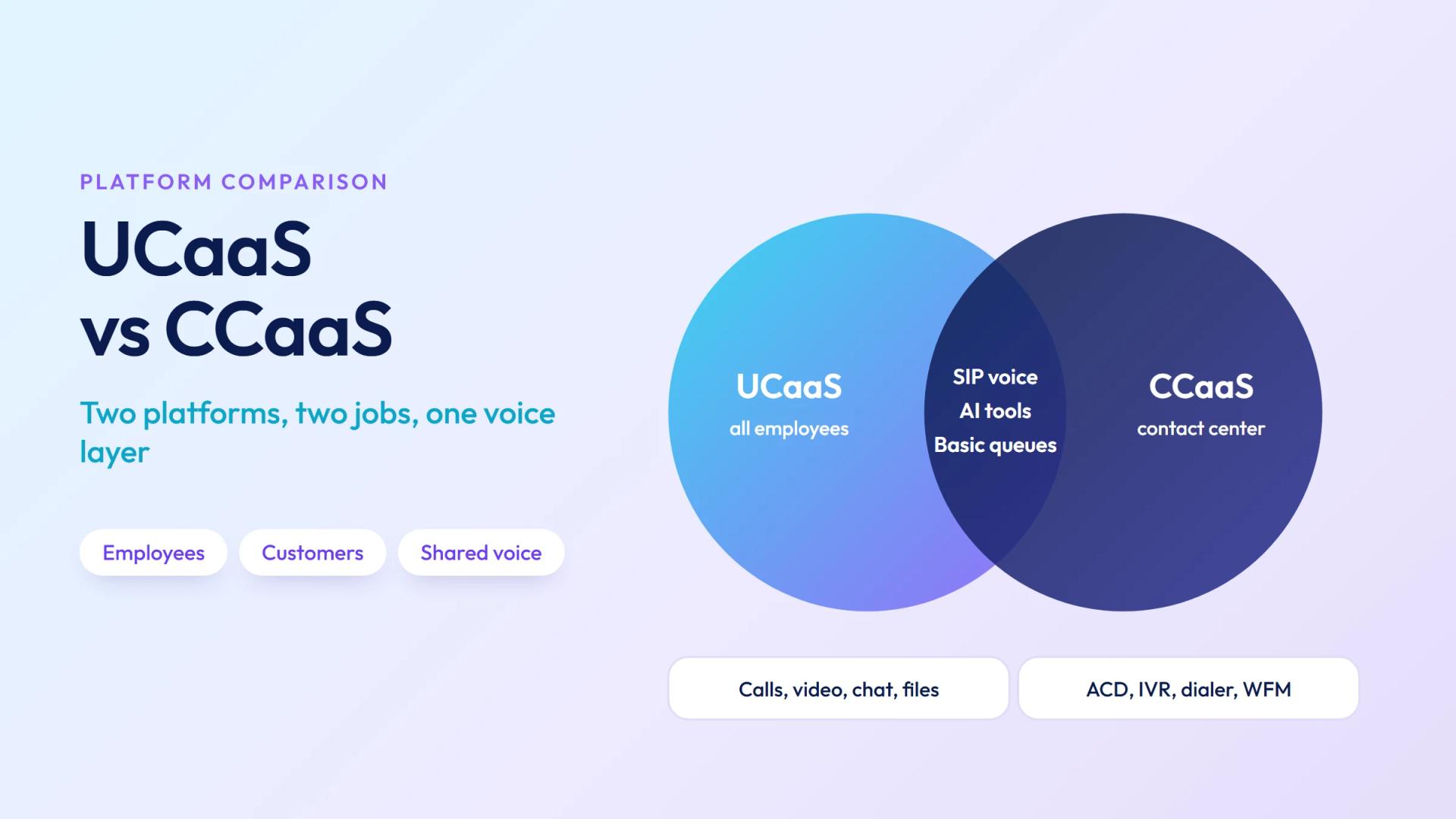
UCaaS is for your whole organization: it replaces the office phone system and adds video conferencing, messaging, and file sharing for every employee. Think: the platform your HR team, sales reps, and operations staff use to communicate with each other and with customers day-to-day.
CCaaS is for your contact center: it's a specialized platform for the teams whose primary job is handling customer interactions at volume — with call queuing, IVR, outbound dialing, quality monitoring, and workforce management built in. Think: the platform your 50-agent support team uses to route, handle, and measure every inbound ticket.
The shortest way to tell them apart: a sales rep uses UCaaS. A contact center agent uses CCaaS.
What Is UCaaS?
UCaaS (Unified Communications as a Service) consolidates voice calling, video meetings, team messaging, and file sharing into a single cloud platform, delivered as a per-user monthly subscription. Every employee gets a virtual phone number, a softphone (desktop or mobile app), a video conferencing tool, and a team messaging workspace — all in one place.
UCaaS replaced the traditional office PBX for most organizations. Where a PBX required physical hardware in a server room, UCaaS runs entirely in the cloud — deployable in days, scalable by adding user licenses, and accessible from any device or location.
For a full breakdown of what UCaaS includes and how it works, see our guide on what is UCaaS.
Primary users: All employees — sales, marketing, HR, operations, finance, executive teams.
Leading providers: RingCentral, Microsoft Teams (Phone), Zoom Phone, 8x8, Dialpad, Vonage.
What Is CCaaS?
CCaaS (Contact Center as a Service) is a cloud platform built specifically for customer-facing contact centers. It goes far beyond what UCaaS offers — adding ACD (Automatic Call Distribution) for intelligent routing, IVR for self-service, outbound predictive dialers, omnichannel queue management (voice + email + chat + SMS + social), real-time supervisor dashboards, call recording and QA, and workforce management tools for scheduling and forecasting.
CCaaS replaced on-premise contact center infrastructure for most deployments. The business case mirrors UCaaS: no hardware, pay-per-agent subscription, faster deployment, and automatic access to new AI features as they're released.
For the full breakdown, see our guide on what is CCaaS.
Primary users: Contact center agents, supervisors, QA analysts, workforce planners.
Leading providers: Genesys, Five9, NICE CXone, Talkdesk, Amazon Connect, Avaya, Salesforce Service Cloud Voice.
Ready when you are
Protect your business line.
MCM's local numbers ship with verified caller ID and smart call filtering — customers always know it's really you, and spam never reaches your team.
UCaaS vs CCaaS: Full Comparison
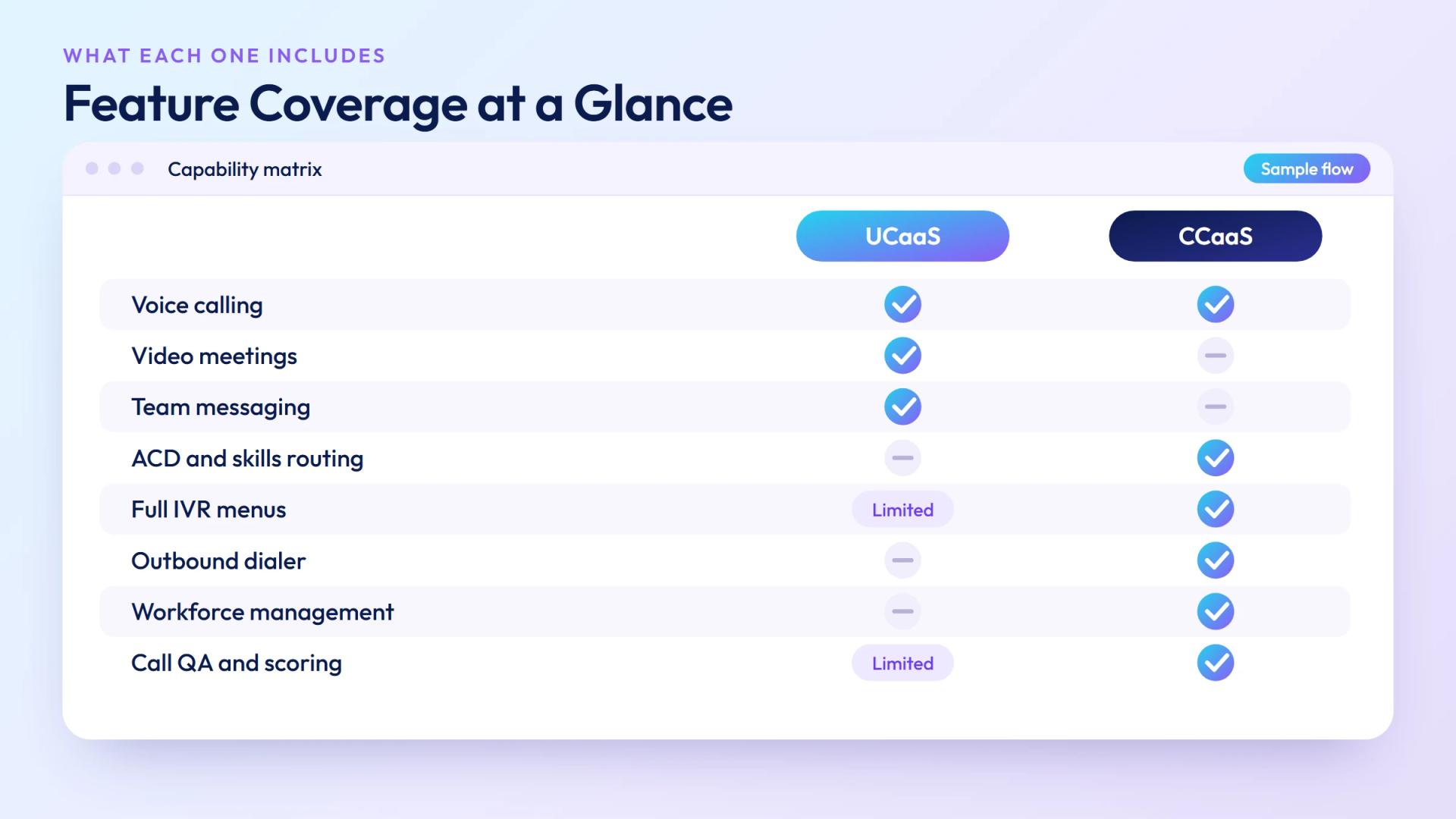
| Factor | UCaaS | CCaaS |
|---|---|---|
| Primary purpose | Internal business communications for all employees | Customer-facing contact center operations |
| Primary users | All employees | Contact center agents & supervisors |
| Voice calling | ✓ Inbound + outbound, basic call handling | ✓ Inbound + outbound, ACD routing, IVR, predictive dialer |
| Video & meetings | ✓ Core feature | ✗ Not included (use UCaaS for internal meetings) |
| Team messaging | ✓ Core feature | ✗ Not included |
| ACD / skills-based routing | ✗ Basic or absent | ✓ Core feature |
| IVR / self-service | Limited (basic auto-attendant) | ✓ Full IVR with multi-level menus and call deflection |
| Omnichannel (chat, email, SMS) | Limited (messaging within platform) | ✓ Unified queue across all digital channels |
| Outbound dialer | ✗ Not included | ✓ Predictive, progressive, and preview dialing |
| Call recording & QA | Basic (compliance recording) | ✓ Full QA scoring, screen recording, supervisor tools |
| Workforce management | ✗ Not included | ✓ Forecasting, scheduling, adherence tracking |
| Real-time analytics | Basic call reports | ✓ Live dashboards, SLA tracking, queue metrics |
| CRM integration | Standard (screen-pop optional) | ✓ Deep integration; screen-pop standard |
| Typical pricing | $20–$65 / user / month | $80–$250 / agent / month |
| Setup time | Days to 1–2 weeks | Weeks to 1–2 months (routing logic, IVR, integrations) |
| Best for | Organizations replacing a PBX; distributed teams; SMBs to enterprise | Organizations with dedicated support/sales agent teams handling high contact volume |
Where UCaaS and CCaaS Overlap
The boundary between UCaaS and CCaaS has blurred as both markets have matured. Several areas now overlap:
- Voice infrastructure: Both platforms use SIP over IP for voice calls and both can connect to the same underlying wholesale VoIP carrier network. For high-volume deployments, using a shared SIP trunk provider for both UCaaS and CCaaS voice traffic can reduce per-minute costs.
- Basic call queuing: Most UCaaS platforms now include simple call queues and auto-attendants — enough for a small team fielding 20–30 calls per day. The gap opens when you need skills-based routing, priority queuing, or overflow management at scale.
- Chat and messaging: UCaaS platforms include internal messaging (like Slack). CCaaS platforms include external customer-facing chat. These are different channels serving different directions, but several vendors now offer both on one platform.
- AI features: AI assistants, real-time transcription, and meeting summaries are now standard in UCaaS. AI agent assist, sentiment analysis, and post-call summarization are increasingly standard in CCaaS. Some vendors are merging these AI layers across both products.
Several vendors — RingCentral, 8x8, and Vonage — market combined UCaaS+CCaaS platforms. The pitch is simplicity: one vendor, one bill, one admin console. The tradeoff is that combined platforms often trail dedicated CCaaS vendors on the more advanced contact center features (predictive analytics, complex IVR logic, WFM depth).
UCaaS vs CCaaS: Which Does Your Business Need?
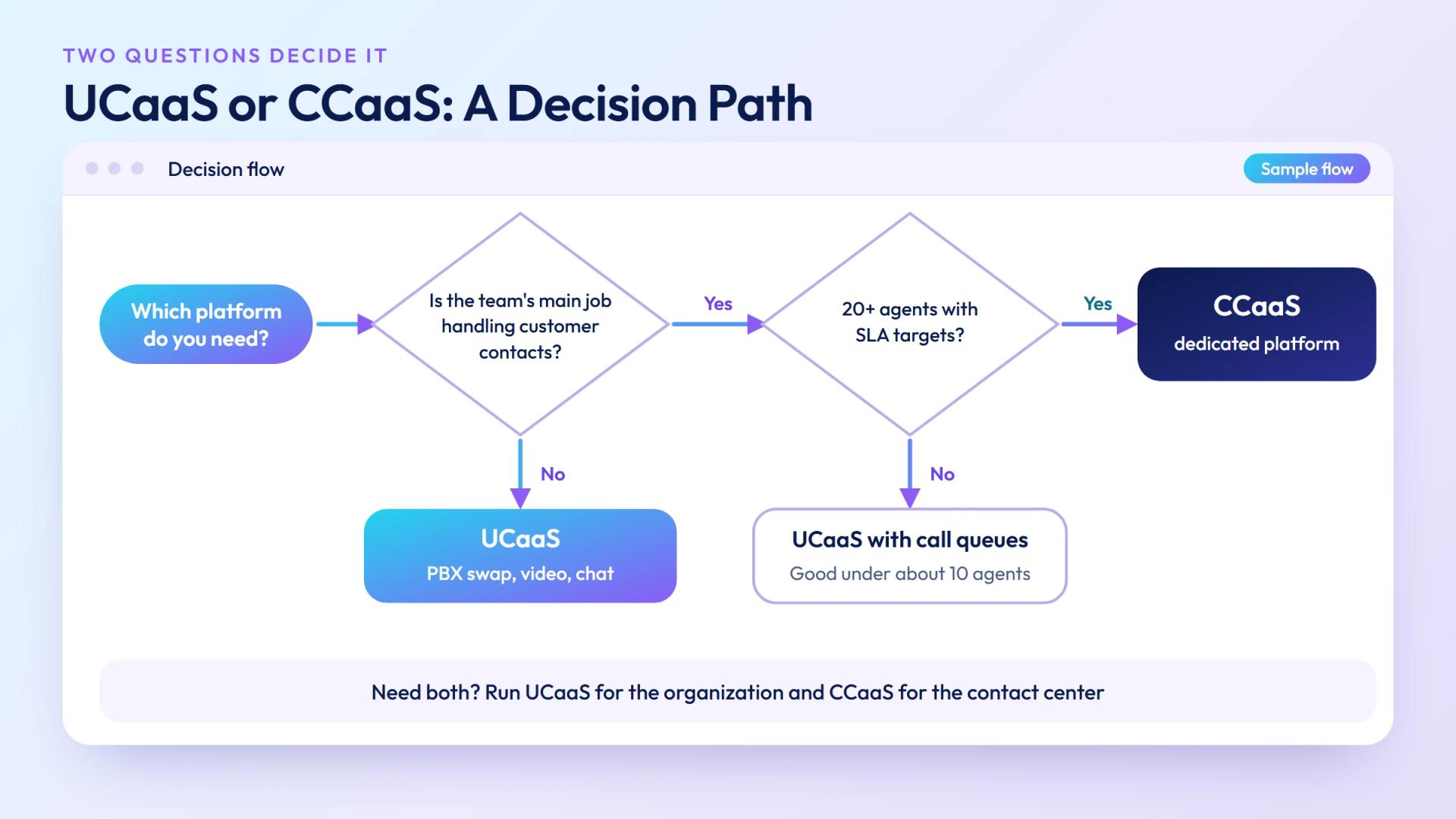
Use this framework to decide:
| Your situation | UCaaS | CCaaS |
|---|---|---|
| You're replacing a traditional office phone system (PBX) | ✓ | ✗ |
| You need video conferencing and team chat for all employees | ✓ | ✗ |
| You have a dedicated team whose primary job is handling customer contacts | ✗ | ✓ |
| You need to route calls to the right agent based on skills or issue type | ✗ | ✓ |
| You run outbound sales or collections campaigns with high dial volume | ✗ | ✓ |
| You need to monitor, record, and score agent calls for quality | ✗ | ✓ |
| You handle customer contacts across email, chat, and social — not just voice | ✗ | ✓ |
| You have under 10 agents handling a moderate inbound call volume | ✓ (with call queues) | May be over-specified |
| You have 20+ agents with SLA targets and supervisor oversight | ✗ | ✓ |
| You need both internal communications AND a contact center | ✓ | ✓ (run both) |
The rule of thumb: if your team's job title is "agent" or "rep" and their primary metric is calls handled, AHT, or CSAT score — that's a CCaaS use case. If their job title is anything else and they just need a business phone and a way to meet — that's a UCaaS use case.
Can You Run UCaaS and CCaaS Together?
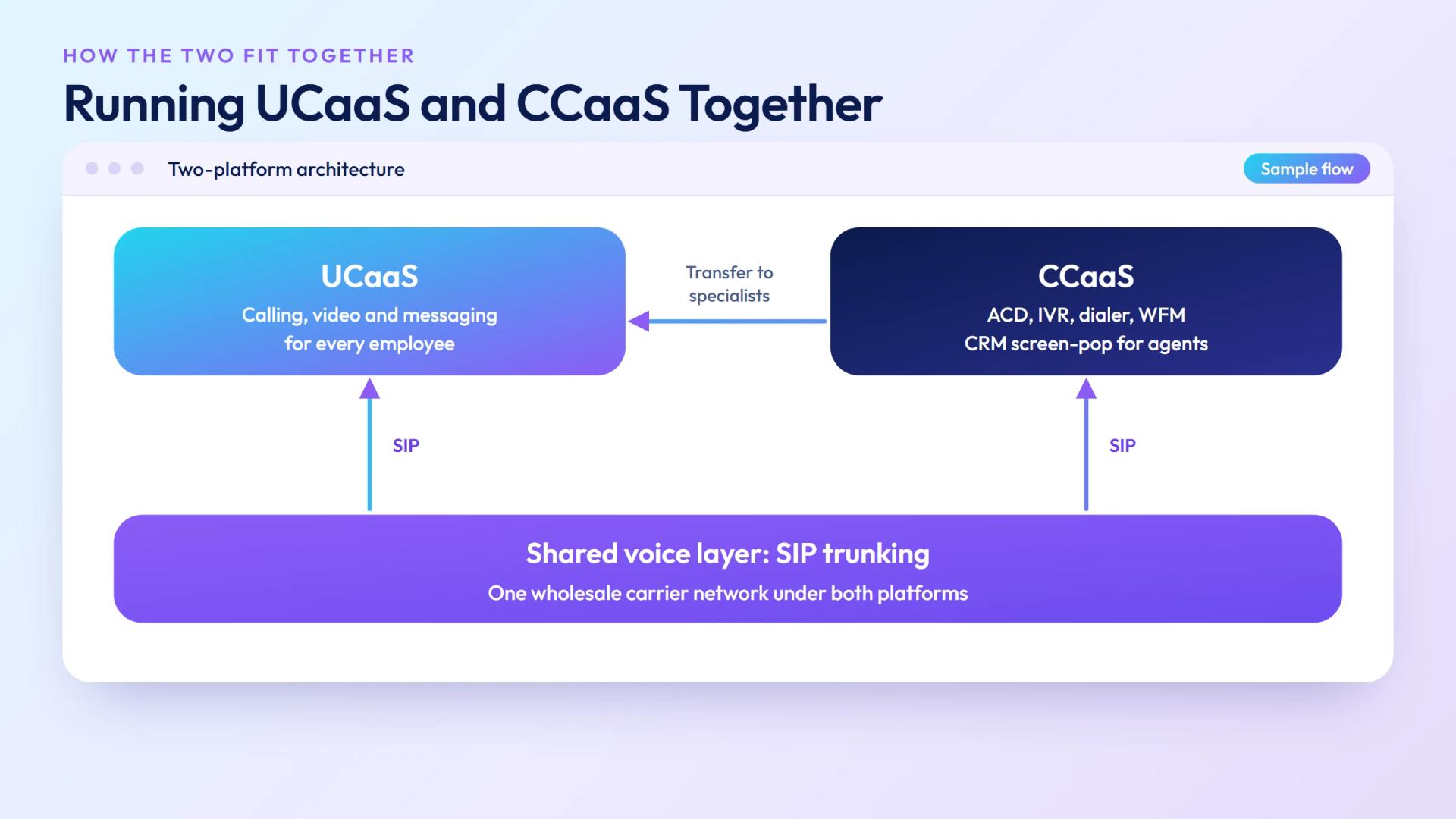
Yes — and many mid-to-large enterprises do. The typical architecture looks like this:
- UCaaS for the whole org: All 500 employees use RingCentral or Microsoft Teams for calling, video, and messaging.
- CCaaS for the contact center: The 80-agent support team uses Genesys or Five9 for their specialized routing, IVR, WFM, and quality monitoring needs.
- Integration layer: The CCaaS platform integrates with the CRM (Salesforce, HubSpot), and the UCaaS platform handles escalations from the contact center to subject matter experts in the broader org — an agent can transfer to a product specialist via UCaaS without leaving the CCaaS environment.
This two-platform model gives each team the right tool for their job. The overhead is two vendor relationships and two admin consoles — a reasonable trade-off at scale. Smaller organizations (under 20 agents) often find that a UCaaS platform with strong call queue features covers both needs adequately until contact center volume justifies a dedicated CCaaS investment.
UCaaS vs CCaaS Pricing
Pricing varies by vendor and feature tier, but the ranges are well-established:
| Tier | UCaaS (per user/month) | CCaaS (per agent/month) |
|---|---|---|
| Entry / Voice-only | $15–$25 | $50–$80 |
| Professional / Mid | $30–$50 | $100–$150 |
| Enterprise / Full-featured | $50–$65 | $150–$250 |
| AI-enabled add-ons | +$10–$20/user | +$20–$50/agent |
CCaaS costs significantly more per seat than UCaaS — roughly 3–4× at comparable tiers — because it includes dramatically more specialized infrastructure: ACD engines, predictive dialers, WFM systems, and quality monitoring tools that have no equivalent in a standard UCaaS platform.
The other cost variable for both platforms is voice: most UCaaS and CCaaS vendors bundle domestic calling minutes, but international calling and high outbound volumes are billed separately. Organizations with large international contact center operations frequently use a Bring Your Own Carrier (BYOC) model — connecting their CCaaS or UCaaS platform to a wholesale SIP trunk provider — to control per-minute costs rather than paying the platform's bundled rates.
Why My Country Mobile
UCaaS and CCaaS built on carrier-grade wholesale voice. Whether you need UCaaS for your whole org, CCaaS for your contact center, or both, My Country Mobile delivers cloud communications with direct-interconnect SIP infrastructure underneath, so you control the platform and the per-minute cost.
Ready when you are
Ready to sound local everywhere you sell?
MCM activates business numbers in minutes, with call routing, analytics, and CRM-ready integrations. Start your trial — no card to browse inventory.
Frequently asked questions
What is the difference between UCaaS and CCaaS?
UCaaS delivers internal business communications — voice, video, messaging, and file sharing — for all employees. CCaaS is built for customer-facing contact centers, adding ACD, IVR, outbound dialing, quality monitoring, and workforce management. Both are cloud subscriptions, but they serve different users and use cases.
Can a business use both UCaaS and CCaaS?
Yes. Many enterprises run UCaaS for internal communications and a separate CCaaS platform for their contact center. Some vendors offer combined UCaaS+CCaaS platforms, which simplifies vendor management but may add cost for contact center teams who don't use UCaaS features.
Is UCaaS or CCaaS better for a small business?
For most small businesses without a dedicated contact center, UCaaS is the better fit — it covers calling, video, and messaging for the whole team at $20–$50/user/month. If your business runs a support team handling high inbound call volume with IVR and call queuing needs, a lightweight CCaaS platform may be worth adding.
What does CCaaS include that UCaaS doesn't?
CCaaS adds ACD for skills-based routing, full IVR with multi-level menus, outbound predictive dialers, omnichannel queue management, real-time supervisor dashboards, call recording and QA scoring, and workforce management. These are contact-center-specific capabilities standard UCaaS platforms don't include.
How much does UCaaS cost compared to CCaaS?
UCaaS typically costs $20–$65/user/month. CCaaS is significantly more — $80–$150/agent/month for professional tiers, rising to $150–$250 for full omnichannel with AI. CCaaS costs more because it includes more complex infrastructure: ACD, predictive dialers, WFM, and quality monitoring tools.
What are examples of UCaaS and CCaaS providers?
Leading UCaaS providers: RingCentral, Microsoft Teams, Zoom Phone, 8x8, Dialpad, Vonage. Leading CCaaS providers: Genesys, Five9, NICE CXone, Talkdesk, Amazon Connect, Avaya, Salesforce Service Cloud Voice. Some vendors (RingCentral, 8x8) offer both. My Country Mobile provides UCaaS and CCaaS with wholesale voice infrastructure for high-volume deployments.